
STS Inks XPD2 500 ml Ink Cartridges CMYK & White – Exclusively for the STS XPD-924D DTF Printer (USA-Made)
STS
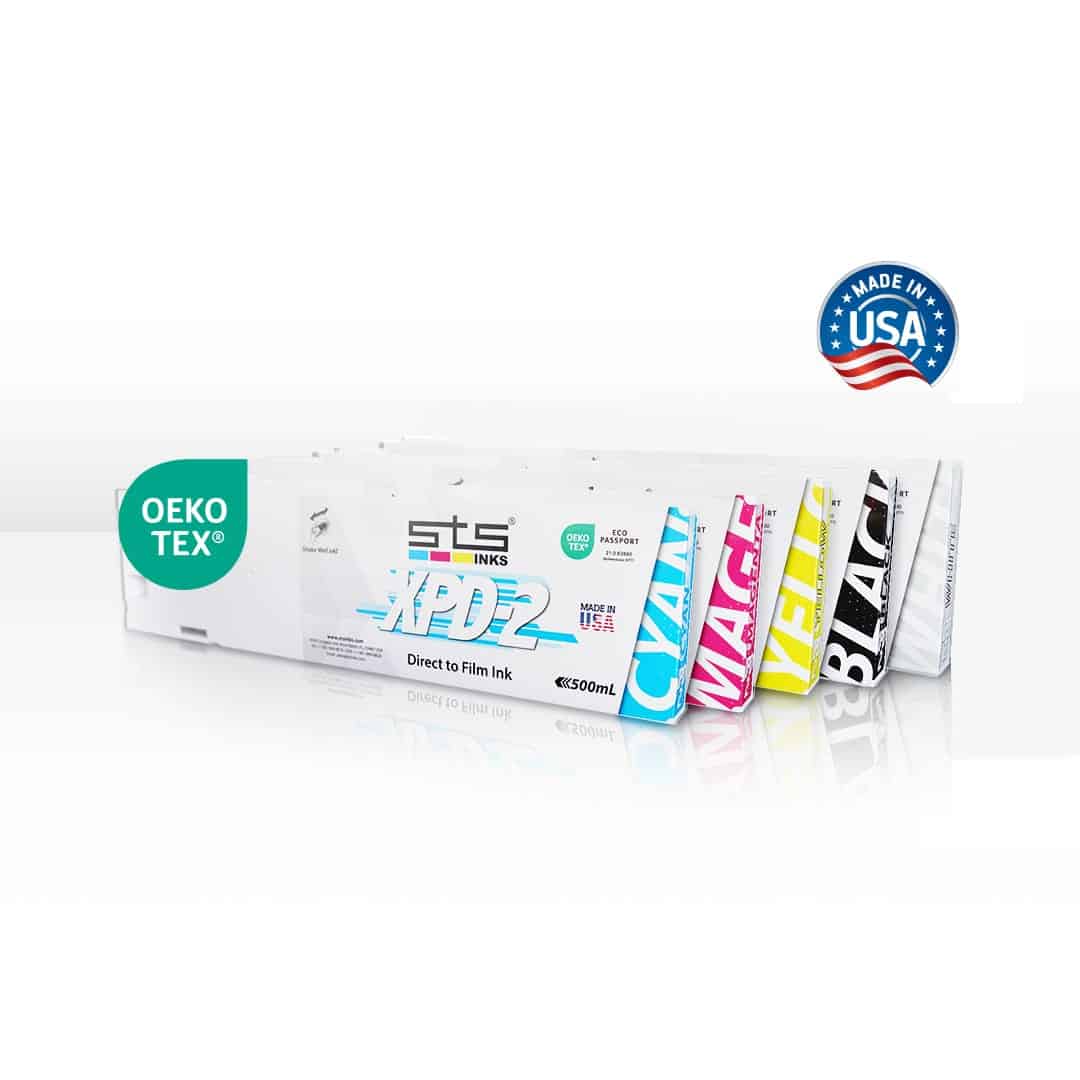
The STS XPD2 500ml DTF Ink Cartridges are precision-engineered, USA-made direct-to-film inks formulated exclusively for the STS XPD-924D 24″ DTF Printer. Available in Cyan, Magenta, Yellow, Black (CMYK), and White, these 500ml cartridges deliver production-grade color density, smooth jetting, and outstanding wash durability — every single print run.
|
🆕 Free Shipping Over $200
|
📞 (512) 454-0505
Price range: $55.71 through $471.42

Description
Professional DTF Inks. Built to Match Your Printer.
The STS XPD2 500ml DTF Ink Cartridges are the OEM-designed ink system created exclusively for the STS XPD-924D 24-inch Direct-to-Film printer. Every channel — Cyan, Magenta, Yellow, Black, and White — performs exactly as the printer was engineered to expect, delivering consistent, vibrant, production-ready DTF transfers from the first cartridge to the last.
What Sets STS XPD2 Inks Apart
STS engineers developed the XPD2 ink system specifically to pair with the XPD-924D’s dual AccuFine HD printheads and built-in white ink circulation system — printer-matched viscosity, surface tension, and colorimetry.
STS’s proprietary degassing process removes dissolved air before the ink is sealed into the cartridge — eliminating micro-bubbles, print artifacts, and the head clogs that come with cheaper inks.
Encapsulation protects Epson piezo printheads from abrasion and buildup. Nano-sized pigments deliver ultra-fine dot placement for sharper lines and smoother gradients.
Strong opacity on both light and dark fabrics. The XPD-924D’s dedicated white ink circulation system keeps white agitated and print-ready at all times — even while idle.
STS DTF transfers pass AATCC 61 Method 2A — the same standard used for screen printing. Colors and adhesion hold through repeated wash cycles when properly applied.
Third-party verified certification confirming strict environmental and operator safety standards. A safer shop, a greener operation — documentation your customers can trust.
STS XPD2 vs. Generic Third-Party DTF Inks
Not all DTF inks are equal. Here is how STS XPD2 compares to typical generic or off-brand inks sold for Epson-based DTF systems.
| Feature | STS XPD2 Inks | Generic DTF Inks |
|---|---|---|
| Formulated for XPD-924D | ✓ | ✗ |
| Degassed (micro-bubble free) | ✓ | Rarely |
| OEKO-TEX ECO Passport Certified | ✓ | ✗ |
| Printhead Warranty Eligible | ✓ | ✗ |
| Encapsulated nano-pigment formula | ✓ | Varies |
| Batch-to-batch color consistency | ✓ | Inconsistent |
| AATCC 61 2A wash fastness tested | ✓ | Rarely documented |
| Manufactured in USA | ✓ | Typically overseas |
| Pre-loaded RIP color profiles | ✓ | Manual ICC required |
| Dealer support & US supply chain | ✓ | Limited |
See the STS XPD-924D in Action
Heat Press Application Guide
Correct heat press settings are critical for wash-durable transfers. Use this table as your starting point — always run a test press and test wash before full production on a new fabric type.
| Fabric / Substrate | Temp (°F) | Dwell Time | Pressure | Peel | Notes |
|---|---|---|---|---|---|
| 100% Cotton | 300–320°F | 12–15 sec | Medium | Cold | Best adhesion. Let cool fully before peeling. |
| 50/50 Poly-Cotton | 290–310°F | 12–15 sec | Medium | Cold | Most common blend. Very reliable results. |
| 100% Polyester | 275–295°F | 10–12 sec | Medium-Light | Cold | Lower temp prevents dye migration. Use silicone sheet. |
| Tri-Blend | 280–300°F | 12–15 sec | Medium | Cold | Soft texture — even pressure. Test wash recommended. |
| Nylon / Performance | 265–285°F | 10–12 sec | Light | Warm | Heat-sensitive. Lower temp, shorter time. Always test first. |
| Denim | 305–325°F | 15–18 sec | Medium-Firm | Cold | Thick weave — longer dwell for full adhesion. Press flat first. |
| Canvas / Tote Bags | 305–325°F | 15–18 sec | Medium-Firm | Cold | Use parchment paper cover sheet. Flat press essential. |
| Athletic / Stretch | 275–295°F | 10–12 sec | Light | Warm | DTF excels here — stretches and recovers without cracking. |
Always pre-press your garment 3–5 seconds to remove moisture and wrinkles before applying a DTF transfer. Moisture is the #1 cause of adhesion failure. A Teflon or parchment cover sheet protects the transfer surface during press.
Substrate & Fabric Compatibility
One of DTF’s biggest advantages over screen printing and DTG is substrate versatility. STS XPD2 transfers adhere to virtually any fabric — no pre-treatment required.
| Fabric / Substrate | Compatibility | Pre-Treatment | Notes |
|---|---|---|---|
| 100% Cotton | Excellent | None | Best adhesion; most forgiving for beginners |
| 50/50 Poly-Cotton | Excellent | None | Most popular DTF substrate; consistent results |
| 100% Polyester | Excellent | None | Lower press temp to prevent dye migration |
| Tri-Blend | Very Good | None | Soft feel transfers; test wash recommended |
| Athletic / Performance Polyester | Excellent | None | Ideal for jerseys & activewear — stretches without cracking |
| Nylon | Good | None | Use lower temp; always test on specific nylon type |
| Denim | Very Good | None | Longer press time for full adhesion through thick weave |
| Canvas / Cotton Canvas | Very Good | None | Great for tote bags, aprons, pouches |
| Fleece / Sweatshirt | Very Good | None | Flatten pile with firm pressure before applying transfer |
| Rayon / Viscose | Good | None | Heat-sensitive; lower temp, test first |
| Leather / Faux Leather | Variable | None | Test specific material; real leather varies widely |
| 100% Silk / Delicates | Not Recommended | — | Heat press temperatures damage delicate fibers |
Available Ink Channels
Ink Consumption & Usage Ratio Guide
White ink is the heaviest consumer in any DTF system and the one most likely to run out mid-production if not planned for. The XPD-924D uses two white cartridge slots for exactly this reason.
For every 1 CMYK cartridge consumed, expect to go through 2–3 White cartridges. Dark garment production skews even higher toward White.
Never let White run completely empty during a print run — the XPD-924D’s circulation system can introduce air into the lines if a cartridge empties mid-job. Keep a spare White cartridge on hand at all times and swap when the low-ink indicator appears.
How STS XPD2 Protects Your XPD-924D Investment
The XPD-924D continuously circulates white ink to prevent pigment settling. XPD2 White is formulated to perform reliably in this active loop without degradation.
Non-STS inks risk clogging AccuFine HD nozzles. XPD2’s encapsulated nano-pigments flow cleanly through micro-nozzles without buildup or abrasion.
Running XPD2 inks and completing STS’s ink registration keeps you eligible for the STS printhead warranty. Third-party inks typically void this coverage.
CADlink Digital Factory 11 and neoStampa DELTA profiles are calibrated for XPD2 inks — accurate color out of the box without manual ICC recalibration.
XPD-924D Maintenance Schedule (with XPD2 Inks)
A consistent maintenance routine is the single best thing you can do to protect your printheads and maximize uptime. The XPD-924D automates many of these tasks, but a few manual steps are essential.
| Frequency | Task | Purpose |
|---|---|---|
| Daily — Start | Print a nozzle check pattern before the first job | Confirms all nozzles firing; catch problems before wasting media |
| Daily — End | Run auto-cleaning cycle; cap heads properly | Prevents ink drying on nozzle face overnight; keeps white in circulation |
| Weekly | Inspect and wipe capping station and wiper blade; check ink levels | Dried ink buildup on the capping station causes poor suction and capping |
| Weekly | Check media path and platen for debris | Prevents feed issues and printhead strikes from platen debris |
| Monthly | Deep clean with XPD2 Cleaning Solution cartridge; inspect HEPA and charcoal filters | Flushes accumulated pigment; clean filters maintain shop ventilation |
| Monthly | Run Dropmaster 2 bi-directional alignment check | Keeps dual heads perfectly aligned for artifact-free prints at speed |
| As Needed | Power clean or nozzle busting solution for stubborn clogs | Use STS Nozzle Busting Solution only — never third-party flush fluids with XPD2 inks |
If the XPD-924D will be idle more than 3 days, run a cleaning cycle and leave white ink circulation running. For extended downtime (1+ week), call (512) 454-0505 for STS-recommended idle storage procedures.
STS DTF Printer Ink Compatibility Chart
| STS Printer Model | Print Width | Correct Ink Line | Volume | XPD2 Compatible? |
|---|---|---|---|---|
| STS XPD-924D ★ | 24 in | STS XPD2 DTF Ink | 500 ml | ✓ |
| STS XPD-724 | 13 in | STS XPD DTF Cartridge 220ml | 220 ml | ✗ |
| STS XPJ-1682D | 64 in | STS Standard 500ml DTF Cartridge | 500 ml | ✗ |
| Epson-Based Desktop DTF Systems | 13–17 in | STS Direct-to-Transfer Film Ink (250ml / 500ml / 1L bottle) | 250ml–1L | ✗ |
★ XPD2 cartridges are exclusively compatible with the STS XPD-924D. Not sure which ink your printer needs? Call (512) 454-0505.
XPD2 inks are formulated exclusively for the XPD-924D. Using them in any other printer can damage printheads and voids equipment warranties.
1 year from manufacture date. Store in a cool, dry location. Do not freeze.
Pre-loaded color profiles for XPD2 are included in CADlink Digital Factory v11 and neoStampa DELTA. No additional ICC profiling required.
Complete Your XPD-924D Setup
Double-sided matte roll matched to the XPD-924D’s 24.5″ print width. V7, V8, EV1, KV1.
Custom-blended hot-melt TPU powder. Bonds transfers to cotton, poly, nylon, blends, and more.
Fully automatic 24″ IR powder shaker — the perfect companion for the XPD-924D.
Same XPD2 formula in high-capacity 1-liter format for busy production runs.
Correct maintenance cartridge for the XPD-924D. Keep 1–2 on hand at all times.
Technical Specifications
STS XPD2 500ml — Ink Specifications
| Specification | Detail |
|---|---|
| Ink Type | Direct-to-Film (DTF) — Pigment-Based |
| Cartridge Volume | 500 ml per cartridge |
| Available Channels | Cyan, Magenta, Yellow, Black (CMYK) & White; Cleaning Solution sold separately |
| Compatible Printer | STS XPD-924D (exclusively) |
| Compatible Printhead | Epson AccuFine HD (staggered dual-head) |
| Pigment Technology | Encapsulated resin + nano-pigment |
| Degassing | Yes — STS proprietary micro-bubble elimination |
| Color Gamut | Wide — high density, vibrant saturation across all channels |
| Washability Standard | AATCC 61 Method 2A |
| Toxicity | Non-toxic, environmentally friendly |
| Certification | OEKO-TEX ECO Passport #21.0.83880 |
| Origin | Made in USA — Boca Raton, Florida |
| Shelf Life | 1 year from manufacture date |
| Storage | Cool, dry location — do not freeze |
| RIP Profiles Included | CADlink Digital Factory v11 & neoStampa DELTA |
| CMYK:White Consumption Ratio | 1:2–3× (White consumes 2–3× faster than any CMYK color) |
| Est. Yield — White (12×12″) | ~250–400 full-coverage prints per 500ml cartridge |
| Est. Yield — CMYK (12×12″) | ~500–800 full-coverage prints per 500ml cartridge |
Compatible Printer — STS XPD-924D Specifications
| Specification | Value |
|---|---|
| Printhead Technology | Drop-on-demand Micro Piezo — 2 staggered AccuFine HD |
| Max Resolution | 1200 × 1200 dpi |
| Max Print Width | 24.5 inches |
| High Speed Mode | 900×600 dpi / 3-pass / 188 ft²/hr |
| Production Mode | 600×1200 dpi / 4-pass / 145 ft²/hr |
| Quality Mode | 900×1200 dpi / 6-pass / 96 ft²/hr |
| High Quality Mode | 1200×1200 dpi / 8-pass / 72 ft²/hr |
| Ink Slots | 6 total (C, M, Y, K + 2× White) |
| White Ink Management | Built-in continuous white ink circulation (24/7) |
| Automation Features | Dropmaster 2, Feed Master, i-screen, Media Tracker, Auto Cleaning |
| RIP Software | CADlink Digital Factory v11 / neoStampa DELTA |
| Interface | Gigabit Ethernet (1000BASE-T) |
| Operating Environment | 68–77°F / 40–55% RH |
| Dimensions (W×D×H w/ stand) | 70.68″ × 35.23″ × 56.48″ (cover closed) |
Technical Sheets / Safety Data Sheets / Documents
FREQUENTLY ASKED QUESTIONS
Frequently Asked Questions — STS XPD2 500ml DTF Inks
No. STS XPD2 500ml inks are formulated exclusively for the STS XPD-924D 24-inch printer. Using the wrong ink in any DTF system can permanently damage the printheads. Call (512) 454-0505 if you are unsure which ink your machine requires.
White is applied as an opaque underbase on every dark garment print and an overprint layer on light garments — heavy coverage on every transfer. It consumes 2–3× more than any individual CMYK color. The XPD-924D dedicates two slots to White for this reason. Always stock White at 2–3× your CMYK quantity.
Dissolved air in ink creates micro-bubbles that cause misfires, streaking, and banding when they reach printhead nozzles. STS’s degassing process removes dissolved oxygen and nitrogen before sealing each cartridge, delivering clean, bubble-free ink flow and dramatically reducing maintenance downtime.
General starting points: 300–320°F for cotton, 275–295°F for polyester and performance fabrics, 12–15 seconds dwell, medium pressure, cold peel. Always pre-press the garment 3–5 seconds to remove moisture first. See the full Heat Press Application Guide in the Description tab for all fabric types. Always test before full production.
Virtually any fabric — cotton, polyester, poly-cotton, nylon, denim, canvas, fleece, athletic/performance, tri-blends, and more. No pre-treatment required. Transfers stretch and recover without cracking, making them ideal for activewear. Silk and very delicate fabrics are not recommended due to heat press temperature requirements. See the full Substrate Compatibility Table in the Description tab.
No. CADlink Digital Factory v11 and neoStampa DELTA — both included with the XPD-924D — contain pre-loaded color profiles calibrated for STS XPD2 inks. Accurate color output out of the box, no manual ICC profiling required.
STS DTF transfers pass AATCC 61 Method 2A — the same standard used for screen printing. When applied at correct time, temperature, and pressure, colors and adhesion hold through repeated commercial wash cycles.
Yes. STS offers a printhead warranty program for XPD-924D owners who register and use STS inks. Running XPD2 keeps you warranty-eligible. Third-party or incompatible inks typically void printhead warranty coverage — a significant financial risk given the cost of AccuFine HD printheads.
Print a nozzle check every morning. Run an auto-cleaning cycle and cap the heads at the end of each day. Weekly: clean the capping station and wiper blade. Monthly: deep clean with XPD2 Cleaning Solution cartridge, inspect filters, and run a Dropmaster 2 alignment check. See the full Maintenance Schedule in the Description tab.
Yes — orders placed before 3:30 PM CT ship same day. Free shipping on orders over $200. River City Supply is an authorized STS dealer stocking XPD2 inks in all channels. Call (512) 454-0505 or email [email protected] for bulk pricing or to build a complete supply kit.
Reviews
Only logged in customers who have purchased this product may leave a review.
You May Also Like
Related products
-

Inktek Adhesive Transfer Powder – Superior Adhesion & Opacity for DTF and Plastisol Transfers
Price range: $99.99 through $499.99 -
STS Inks 24″ DTF Film – Instant Hot or Cold Peel, Double-Sided Matte Direct-to-Film Transfer Roll
$213.21 -
STS Inks TPU Black DTF Powder – 1kg Bag – Premium Polyurethane Adhesive for Dark Garments
$70.00 -
ROQ Impress P08C04-L4 Automatic Screen Printing Press – 4 Presses, 8 Stations, 4 Lasers


Reviews