Chromaline AccuInk Cartridges for Epson 4900 – High Density Black Ink for Film Positives

Chromaline
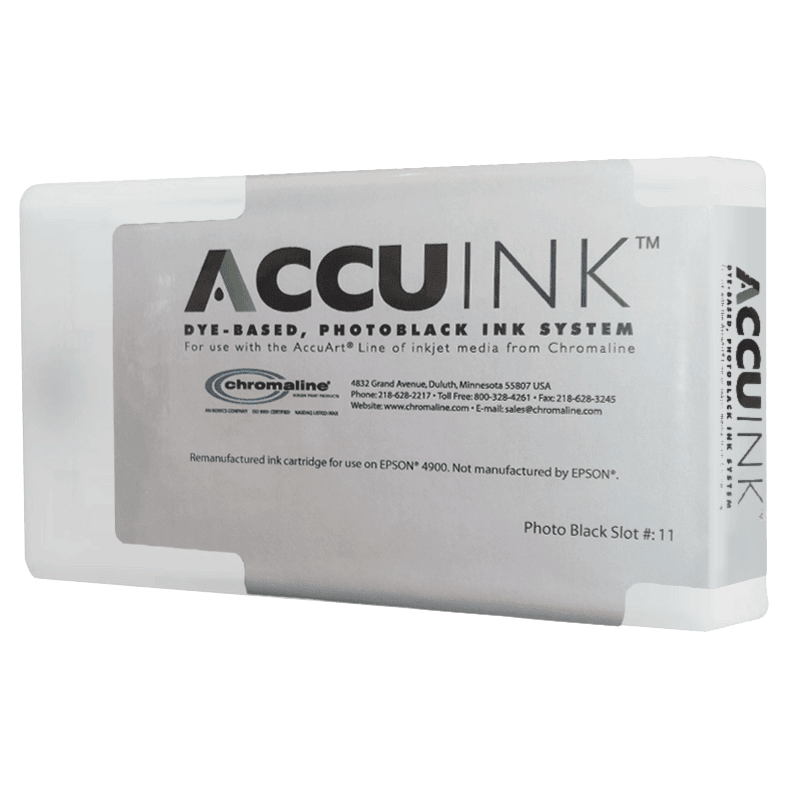
Chromaline AccuInk cartridges for the Epson Stylus Pro 4900 convert this professional 17-inch wide-format inkjet into a high-density film positive printer. The 4900’s 11-channel ink system replaced entirely with AccuInk delivers maximum UV-blocking opacity for clean, detailed screen printing stencils.

Epson Stylus Pro 4900 Compatible11-Channel All Black SystemUV-Blocking Formula17in Wide FormatAccuJet Film CompatibleIndividual or Full SetMade in USALower Cost vs OEM
✓ Same-Day Shipping on orders before 3:30 PM CT Mon–Fri  |  ✓ Free Shipping on orders over $200  |  ✓ Call (512) 454-0505

Price range: $114.29 through $892.90

--- GLOBAL RULE LOCATIONS ---
Array
(
    [0] => stdClass Object
        (
            [post_id] => 1714
            [meta_key] => _pricing_rules
        )

    [1] => stdClass Object
        (
            [post_id] => 2853
            [meta_key] => _pricing_rules
        )

    [2] => stdClass Object
        (
            [post_id] => 2854
            [meta_key] => _pricing_rules
        )

    [3] => stdClass Object
        (
            [post_id] => 2884
            [meta_key] => _pricing_rules
        )

    [4] => stdClass Object
        (
            [post_id] => 2937
            [meta_key] => _pricing_rules
        )

    [5] => stdClass Object
        (
            [post_id] => 2941
            [meta_key] => _pricing_rules
        )

    [6] => stdClass Object
        (
            [post_id] => 2944
            [meta_key] => _pricing_rules
        )

    [7] => stdClass Object
        (
            [post_id] => 2955
            [meta_key] => _pricing_rules
        )

    [8] => stdClass Object
        (
            [post_id] => 2956
            [meta_key] => _pricing_rules
        )

    [9] => stdClass Object
        (
            [post_id] => 2957
            [meta_key] => _pricing_rules
        )

    [10] => stdClass Object
        (
            [post_id] => 2958
            [meta_key] => _pricing_rules
        )

    [11] => stdClass Object
        (
            [post_id] => 2959
            [meta_key] => _pricing_rules
        )

    [12] => stdClass Object
        (
            [post_id] => 2960
            [meta_key] => _pricing_rules
        )

    [13] => stdClass Object
        (
            [post_id] => 2961
            [meta_key] => _pricing_rules
        )

    [14] => stdClass Object
        (
            [post_id] => 2962
            [meta_key] => _pricing_rules
        )

    [15] => stdClass Object
        (
            [post_id] => 2963
            [meta_key] => _pricing_rules
        )

    [16] => stdClass Object
        (
            [post_id] => 2964
            [meta_key] => _pricing_rules
        )

    [17] => stdClass Object
        (
            [post_id] => 2965
            [meta_key] => _pricing_rules
        )

    [18] => stdClass Object
        (
            [post_id] => 2966
            [meta_key] => _pricing_rules
        )

    [19] => stdClass Object
        (
            [post_id] => 2967
            [meta_key] => _pricing_rules
        )

    [20] => stdClass Object
        (
            [post_id] => 2968
            [meta_key] => _pricing_rules
        )

    [21] => stdClass Object
        (
            [post_id] => 2977
            [meta_key] => _pricing_rules
        )

    [22] => stdClass Object
        (
            [post_id] => 3114
            [meta_key] => _pricing_rules
        )

    [23] => stdClass Object
        (
            [post_id] => 4638
            [meta_key] => _pricing_rules
        )

    [24] => stdClass Object
        (
            [post_id] => 4639
            [meta_key] => _pricing_rules
        )

    [25] => stdClass Object
        (
            [post_id] => 4667
            [meta_key] => _pricing_rules
        )

    [26] => stdClass Object
        (
            [post_id] => 3690
            [meta_key] => _pricing_rules
        )

    [27] => stdClass Object
        (
            [post_id] => 3692
            [meta_key] => _pricing_rules
        )

    [28] => stdClass Object
        (
            [post_id] => 3731
            [meta_key] => _pricing_rules
        )

    [29] => stdClass Object
        (
            [post_id] => 3752
            [meta_key] => _pricing_rules
        )

    [30] => stdClass Object
        (
            [post_id] => 3762
            [meta_key] => _pricing_rules
        )

    [31] => stdClass Object
        (
            [post_id] => 3792
            [meta_key] => _pricing_rules
        )

    [32] => stdClass Object
        (
            [post_id] => 3852
            [meta_key] => _pricing_rules
        )

    [33] => stdClass Object
        (
            [post_id] => 3980
            [meta_key] => _pricing_rules
        )

    [34] => stdClass Object
        (
            [post_id] => 4013
            [meta_key] => _pricing_rules
        )

    [35] => stdClass Object
        (
            [post_id] => 4020
            [meta_key] => _pricing_rules
        )

    [36] => stdClass Object
        (
            [post_id] => 4022
            [meta_key] => _pricing_rules
        )

    [37] => stdClass Object
        (
            [post_id] => 4044
            [meta_key] => _pricing_rules
        )

    [38] => stdClass Object
        (
            [post_id] => 4205
            [meta_key] => _pricing_rules
        )

    [39] => stdClass Object
        (
            [post_id] => 4270
            [meta_key] => _pricing_rules
        )

    [40] => stdClass Object
        (
            [post_id] => 4272
            [meta_key] => _pricing_rules
        )

    [41] => stdClass Object
        (
            [post_id] => 4620
            [meta_key] => _pricing_rules
        )

    [42] => stdClass Object
        (
            [post_id] => 4651
            [meta_key] => _pricing_rules
        )

    [43] => stdClass Object
        (
            [post_id] => 4673
            [meta_key] => _pricing_rules
        )

    [44] => stdClass Object
        (
            [post_id] => 4946
            [meta_key] => _pricing_rules
        )

    [45] => stdClass Object
        (
            [post_id] => 5355
            [meta_key] => _pricing_rules
        )

    [46] => stdClass Object
        (
            [post_id] => 5390
            [meta_key] => _pricing_rules
        )

    [47] => stdClass Object
        (
            [post_id] => 5398
            [meta_key] => _pricing_rules
        )

    [48] => stdClass Object
        (
            [post_id] => 5407
            [meta_key] => _pricing_rules
        )

    [49] => stdClass Object
        (
            [post_id] => 5445
            [meta_key] => _pricing_rules
        )

)

Description

Chromaline AccuInk for the Epson Stylus Pro 4900 — 17in Film Positive System

The Epson Stylus Pro 4900 is a professional 17-inch wide-format printer with an 11-channel ink system — one of the most capable desktop large-format platforms available. AccuInk replaces all 11 channels with a UV-blocking dye formulation, converting the 4900 into a production-grade film positive printer for screen printing shops that need wide-format output and fine halftone detail.

🖨️ Epson Stylus Pro 4900 — 11-Channel System
The 4900 uses 11 individual ink channels. AccuInk provides cartridge replacements for all 11 slots — enabling a complete all-black, maximum-density output configuration.
📐 17-Inch Wide Format Output
The 4900 handles separations up to 17 inches wide — covering standard and oversize screen printing jobs well beyond 13×19 output.
☀️ UV-Blocking for Superior Stencils
AccuInk’s UV-blocking dye formula prevents light bleed during screen exposure, producing crisp, opaque stencils with accurate halftone dot reproduction.
🔢 Individual Channel Availability
All 11 ink channel cartridges are available individually for maintenance, or as a complete Full Set for initial system setup.

Compatible Printer Models

Printer Model Max Print Width Use in Screen Printing
Epson Stylus Pro 4900 17 in Film positives — all 11 channels replaced with AccuInk

The Epson 4900 + AccuInk System

11-Channel Configuration
The Stylus Pro 4900 has 11 ink slots: Matte Black, Photo Black, Cyan, Vivid Cyan, Magenta, Vivid Magenta, Yellow, Light Cyan, Light Magenta, Light Black, and Light Light Black. AccuInk replaces every slot for maximum density output through all channels.
RIP Software Required
CADlink FilmMaker RIP software is required to drive all 11 channels simultaneously for maximum ink density. Standard drivers will not achieve this level of output.
Professional-Grade Results
The 4900’s high-precision print head combined with AccuInk’s UV-blocking chemistry and FilmMaker RIP produces film positives with fine halftone detail and maximum opacity — ideal for demanding screen printing applications.
⚠️ Important Notes
The Epson Stylus Pro 4900 has 11 ink channels. Full set replaces all 11 channels. Individual channel cartridges are available for maintenance. A chip resetter is required to authorize non-OEM cartridges in the 4900. For best results, use with Chromaline AccuJet film and CADlink FilmMaker RIP v10.
Upgrade your Epson Stylus Pro 4900 for screen printing
Order by 3:30 PM CT Mon–Fri for same-day shipping · Free shipping over $200
📞 (512) 454-0505  |  ✉️ [email protected]

Technical Specifications

Technical Specifications

Specification Detail
SKU Chromaline 4900 Ink System
Brand Chromaline
Compatible Printer Epson Stylus Pro 4900
Ink Type Dye / Water-Based with UV Blocker
Number of Channels 11 (all replaced in Full Set)
Max Print Width (Printer) 17 inches
Film Compatibility Chromaline AccuJet Waterproof Inkjet Film, AccuBlack Film
Recommended Software CADlink FilmMaker RIP v10
Made In USA
Chip Resetter Required Yes

Technical Sheets / Safety Data Sheets / Documents

FREQUENTLY ASKED QUESTIONS

Frequently Asked Questions

Which Epson printer does this AccuInk kit work with?
This kit is designed specifically for the Epson Stylus Pro 4900 — a 17-inch wide-format printer with 11 individual ink channels. It is not compatible with other Epson models.
Why does the 4900 have 11 ink channels?
The Stylus Pro 4900 was designed as a professional photo printer with an expanded ink set for wide color gamut. For screen printing, all 11 channels are replaced with AccuInk black to achieve maximum overall density through every print head.
Do I need RIP software with the 4900?
Yes — CADlink FilmMaker RIP is required to drive all 11 ink channels simultaneously for maximum density output. Standard drivers cannot force the 4900 to output all channels at full black density.
How does AccuInk compare to Epson 4900 OEM inks?
Epson Stylus Pro 4900 OEM inks are designed for color photo printing, not UV-blocking. AccuInk includes a UV blocker that blocks UV light during screen exposure — something OEM inks cannot do — resulting in dramatically cleaner, more opaque film positives.
Can I order individual channel cartridges?
Yes — all 11 ink channel cartridges are available individually for maintenance purposes. The Full Set (all 11 channels) is recommended for initial setup.
Is a chip resetter required?
Yes — the Epson Stylus Pro 4900 requires a chip resetter to authorize non-OEM cartridges. Contact us at (512) 454-0505 for assistance with chip resetters compatible with the 4900.
Questions about AccuInk for the Epson Stylus Pro 4900?
Call (512) 454-0505 or email [email protected] — Mon–Fri 9am–5pm CT

Reviews

Reviews

Only logged in customers who have purchased this product may leave a review.

You May Also Like

Additional Options