River City 20″ Gold Foil Heat Transfer Vinyl
River City Supply
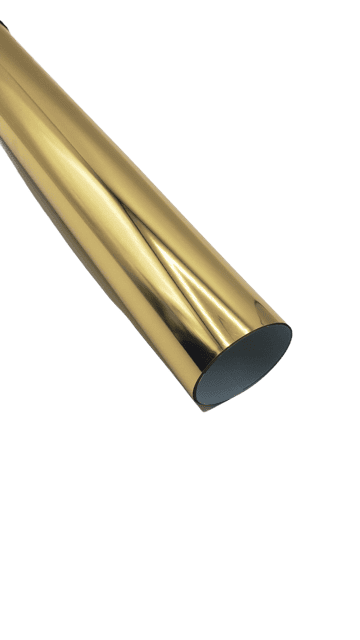


River City 20″ Gold Foil Heat Transfer Vinyl delivers a brilliant, mirror-bright metallic gold finish that cuts, weeds and presses just like standard HTV — no special foil or adhesive needed. Design, cut, weed, press and peel for eye-catching shine on shirts, totes, hats and more.
High-shine reflective finish
Wide format for big designs
Cricut, Silhouette & more
Cotton, blends & polyester
$12.00
Description
River City 20″ Gold Foil Heat Transfer Vinyl
Add a touch of metallic brilliance in Gold. River City Foil HTV gives you a brilliant, reflective metallic finish in a cuttable heat transfer vinyl that behaves exactly like the HTV you already know — cut it, weed it, press it and peel. It’s our own affordable house-brand line, so you can stock every color your customers want and keep your margins healthy.
Color & Finish Options
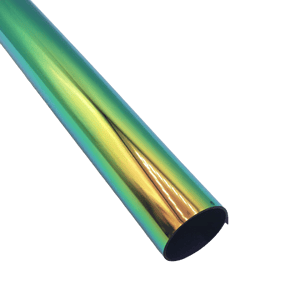
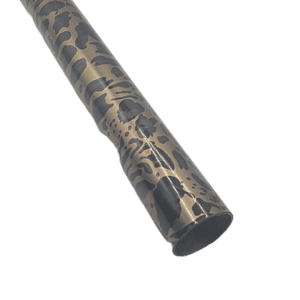
This page is for Gold. Browse the full River City foil range below — from classic gold and chrome to color-shifting chameleon and wild animal prints.
| Color | Finish Type |
|---|---|
| SOLID METALLIC | |
| Gold You’re viewing | Solid Metallic |
| Silver | Solid Metallic |
| Red | Solid Metallic |
| Rose Gold | Solid Metallic |
| Royal Blue | Solid Metallic |
| Green | Solid Metallic |
| Purple | Solid Metallic |
| Turquoise | Solid Metallic |
| Aqua | Solid Metallic |
| Orange | Solid Metallic |
| Fuchsia | Solid Metallic |
| COLOR-SHIFT & SPECIALTY | |
| Rainbow | Color-Shift & Specialty |
| Chameleon Flex | Color-Shift & Specialty |
| Metallic Chameleon | Color-Shift & Specialty |
| Spectrum | Color-Shift & Specialty |
| Fuzzy | Color-Shift & Specialty |
| ANIMAL & FLORAL PATTERN | |
| Leopard Gold | Animal & Floral Pattern |
| Leopard Silver | Animal & Floral Pattern |
| Gold Roses | Animal & Floral Pattern |
| Pink Roses | Animal & Floral Pattern |
| Cheetah | Animal & Floral Pattern |
Swatches are approximate; screens vary. Shop all 21 colors.
Why You’ll Love It
No foil adhesive needed
A self-contained HTV — one material, one press, no separate adhesive layer.
Cuts & weeds easily
Runs on any craft cutter or plotter with standard HTV settings.
Serious shine
A mirror-bright metallic surface that makes designs pop.
20″ wide & affordable
Wide rolls fit bigger designs; house-brand pricing keeps cost low.
Directions For Use
Using River City Foil Heat Transfer Vinyl is a simple process that can add a touch of metallic brilliance to your creative projects. Follow these step-by-step directions to guide you through application.
Application Instructions
Home Iron
- Set iron dial between Cotton and Linen
- Cover design with multipurpose paper or a heat-transfer cover sheet
- Place on a flat, hard surface (ironing board not recommended)
- Press with medium/firm pressure (do not slide the iron)
- Press each section of the design for 10–15 seconds
- If areas lift after application, replace the cover sheet and re-press 5–10 seconds
- Peel carrier warm
Heat Press
- Cover design with multipurpose or heat-transfer cover sheet
- Preheat garment for 2–3 seconds
- Apply design at 275°F / 135°C
- Use medium pressure for 10–15 seconds
- Peel carrier warm
Recommended Cutter Settings
| Cricut | Blade: Standard · Setting: Iron-on |
| Silhouette Cameo | Blade: Standard, 2 · Material: Heat Transfer, Smooth · Speed: 8 · Force: 4 |
| Brother ScanNCut | Blade: Standard, 2 · Cut Speed: 1 · Cut Pressure: 3 |
| Roland GX/GS-24 | Blade: 45° · Gram Force: 80–90 · Offset: .250 · Speed: 30–50 cm/s |
| Graphtec | Blade: 45° · Force: 8–9 · Tool: CB09U+0 · Speed: 30 cm/s |
| MH, SC2, LP3, Titan 1 | Blade: 45°/60° · Gram Force: 85–90 · Speed: 300 mm/s · *blade advancing varies |
| Titan 2 & 3 | Blade: 45°/60° · Gram Force: 65–70 · Speed: 300 mm/s · *blade advancing varies |
Settings may vary based on blade condition and age of machine. Always perform a test cut prior to cutting designs.
Perfect For
Spirit wear & team names · cheer and dance apparel · fashion tees & tanks · tote bags · hats & beanies · onesies · holiday and event shirts · anything that needs to catch the light.
Everything To Finish The Job
Even heat & pressure for clean, lasting transfers.
Protect the finish and weed designs fast.
Solid-color HTV to layer and pair with your foils.
Browse the full metallic & pattern range.
Why Buy From River City Supply?
Real printers who press garments every day.
Technical Specifications
Gold Foil HTV – Technical Specs
Technical Sheets / Safety Data Sheets / Documents
FREQUENTLY ASKED QUESTIONS
Gold Foil HTV – FAQ
Need help choosing a color or dialing in your press?
We press garments daily and are happy to help.
Reviews
Only logged in customers who have purchased this product may leave a review.
You May Also Like
Related products
-
Sale!

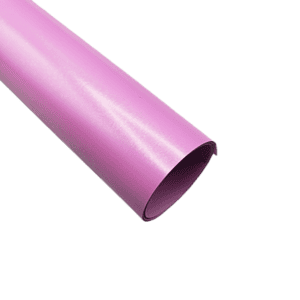
Siser Easyweed 15” Stretch Bright Orchid Heat Transfer Vinyl – Thin and Flexible HTV
Original price was: $10.99.$5.00Current price is: $5.00. -
Sale!
River City 20” Metallic Chameleon Foil Heat Transfer Vinyl – Metallic Brilliance
Original price was: $12.00.$5.00Current price is: $5.00. -
Sale!
River City 20” Cheetah Foil Heat Transfer Vinyl Pattern – Metallic Brilliance
Original price was: $12.00.$5.00Current price is: $5.00. -
Sale!
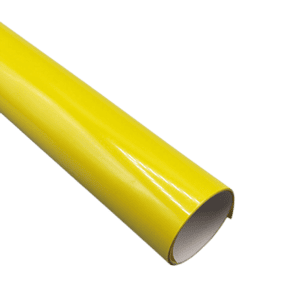
Siser Easyweed 15” Stretch Lemon Heat Transfer Vinyl – Thin and Flexible HTV
Original price was: $10.99.$5.00Current price is: $5.00.
Reviews