Printers Choice White D-Haze Remover – Powerful Ghost and Stain Remover for Screen Printing
Printers Choice
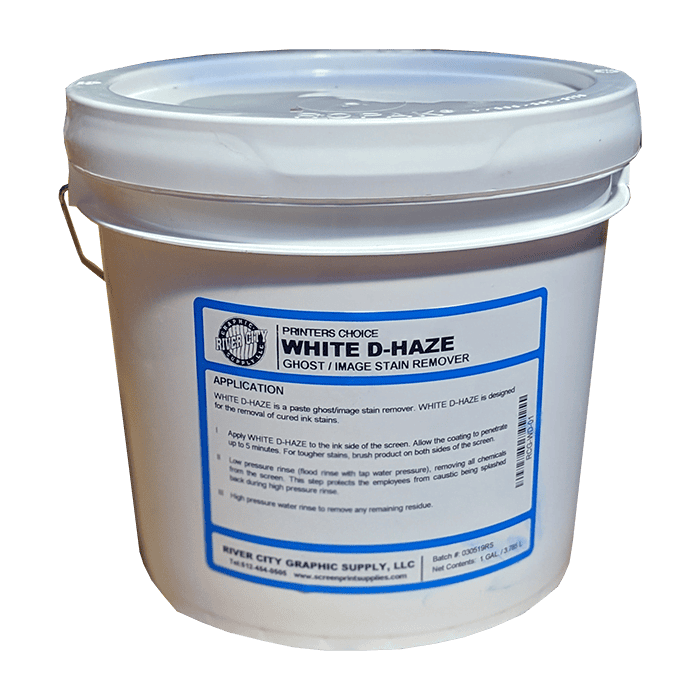
Printers Choice White D-Haze Remover is a professional-grade haze and ghost image remover designed for screen printing shops. It eliminates stubborn ink stains and ghost images left in the mesh after reclaiming, restoring screens to a clean, reusable condition without damaging the mesh or frame.
Price range: $29.99 through $349.95
Description
Printers Choice White D-Haze Remover
Every reclaimed screen leaves behind a story — ink stains, ghost images, and haze that build up over time and eventually cause print quality problems. Printers Choice White D-Haze Remover is formulated specifically to eliminate that residue and restore your mesh to a clean printing surface. Use it as the final step in your screen reclaim process for screens that see heavy ink rotation or color-sensitive jobs.
Ghost Image Removal
Eliminates ghost images and ink haze that remain in the mesh after standard emulsion removal and washing.
Safe on All Mesh Types
Compatible with polyester mesh across all mesh counts. Will not degrade or stretch mesh fibers with proper use.
Plastisol & Water-Based
Works on residue from both plastisol and water-based inks, making it versatile for shops running multiple ink systems.
Printers Choice System
Designed to work as part of the complete Printers Choice reclaim system alongside their emulsion remover and press wash.
What You Receive
- ✔Printers Choice White D-Haze Remover in your selected size
- ✔Sealed container for safe transport and storage
How to Use White D-Haze Remover
Step 1 — Reclaim First
Complete your standard screen reclaim process: remove ink, strip emulsion, and rinse the screen thoroughly before applying haze remover.
Step 2 — Apply to Wet Screen
Apply White D-Haze Remover directly to the wet screen mesh. Work it into the mesh with a brush or scrub pad on both sides.
Step 3 — Dwell Time
Allow the product to dwell on the screen for 1–2 minutes to break down embedded haze and ghost images.
Step 4 — Scrub & Rinse
Scrub the mesh and rinse thoroughly with high-pressure water. Repeat if ghost images remain on heavily stained screens.
When Do You Need Haze Remover?
Haze remover is needed when ghost images or ink staining remains in the mesh after a standard reclaim. This is especially common on screens used for dark inks, discharge printing, or jobs with heavy ink deposits. Left untreated, ghost images can contaminate future print runs and cause quality issues on color-sensitive jobs.
Extending Screen Life
Regular use of haze remover as part of your reclaim routine keeps mesh open and free of residue buildup. Cleaner mesh holds emulsion better, exposes more crisply, and lasts longer before replacement is needed. For high-volume shops reclaiming dozens of screens per week, this adds up to significant savings over time.
⚠️ Safety Note
Wear gloves and eye protection when handling haze remover. Avoid contact with skin and eyes. Use in a well-ventilated area. Do not mix with other chemicals.
💧 Dilution & Usage
Use undiluted for best results on stubborn haze. For light ghost images, the product may be diluted with water. Follow label directions for specific dilution ratios and dwell times.
Ready to Clean Up Your Screens?
Order Printers Choice White D-Haze Remover from River City Supply. Same-day shipping before 3:30 PM CT.
🏆 Why Order from River City Supply?
📦 Deep Inventory
Top screen printing chemical brands in stock year-round — no waiting on backorders.
🚚 Same-Day Shipping
In-stock orders placed before 3:30 PM CT ship the same day from San Antonio, TX.
🌡️ San Antonio Advantage
South Texas winters mean warmer temps and less freeze risk than northern warehouses.
🎁 Free Shipping Over $200
Free ground shipping on all orders over $200. Stock up and save on delivery.
Technical Specifications
| Printers Choice White D-Haze Remover — Technical Specifications | |
|---|---|
| Product Name | Printers Choice White D-Haze Remover |
| Product Type | Haze & Ghost Image Remover |
| Form | Liquid |
| Color | White |
| Application | Screen printing mesh haze and ghost removal |
| Ink Compatibility | Plastisol, water-based ink residue |
| Mesh Compatibility | All polyester mesh types and counts |
| Method of Use | Apply to wet screen, scrub, rinse |
| Dilution | Use undiluted or per label directions |
| Brand | Printers Choice |
| Available Sizes | Contact us for current size availability |
Technical Sheets / Safety Data Sheets / Documents
Printers Choice White Haze Remover SDS
FREQUENTLY ASKED QUESTIONS
What is the difference between haze remover and emulsion remover?
Emulsion remover dissolves and removes the photopolymer stencil from the mesh. Haze remover is used after that — it removes the ink staining and ghost images left behind in the mesh fibers once the emulsion is already gone. Both products are needed for a complete reclaim process.
Do I need to remove the emulsion before using White D-Haze Remover?
Yes. Haze remover is a post-reclaim product. The emulsion should be fully removed and the screen rinsed before applying the haze remover. Applying it over emulsion will not improve emulsion removal and may interfere with results.
Will this damage my mesh or lower mesh count accuracy?
No. Printers Choice White D-Haze Remover is formulated to be safe on polyester mesh when used as directed. It will not stretch, weaken, or degrade properly maintained mesh. Always rinse thoroughly after use to remove all chemical residue.
How do I know if my screens need haze remover?
After reclaiming, hold the screen up to a light source. If you can see a visible ghost of the previous image in the mesh, or if the mesh appears stained with ink color, haze remover is needed before the screen goes back into production.
Can I use White D-Haze Remover in a dip tank?
White D-Haze Remover is designed for hand application and brush scrubbing, not for dip tank reclaim systems. For automatic or dip tank reclaim, see the dedicated Printers Choice dip tank chemistry options.
Does River City Supply stock Printers Choice products?
Yes. River City Supply stocks the complete Printers Choice chemical line from our San Antonio, TX warehouse. Orders placed before 3:30 PM CT ship the same day. Free shipping on orders over $200.
Reviews
Only logged in customers who have purchased this product may leave a review.
You May Also Like
Related products
-

Printers Choice Ink Degradent – Liquid Ink Remover for Screen Printers
Price range: $14.99 through $169.99 -
Sale!
CCI ECO-STRIP® Part A – Ink & Haze Remover for Automatic and Manual Screen Reclaiming
Original price was: $2,454.65.$2,199.99Current price is: $2,199.99. -
Rhino HR2800 Haze Remover – Heavy-Duty Ghost & Stain Remover for Screen Printing
$34.99 -
CCI Aqua-Block Water-Resistant Blockout – Durable Blockout for Water-Based & Plastisol Screen Printing
Price range: $24.99 through $1,136.40

Reviews