
River City Supply — Emulsion Resource
Screen Printing Emulsion Troubleshooting Guide
If your screens are washing out, breaking down on press, or coming out with pinholes, you're in the right place. This guide covers the most common emulsion problems screen printers encounter — what causes them and exactly how to fix them.
⚠ Start Here: Use an Exposure Calculator
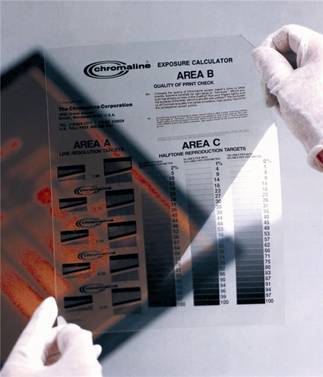
The single most common cause of emulsion failure is incorrect exposure time. Every exposure unit is different — UV output, lamp age, distance, and bulb type all affect your time. Use the Chromaline 10-Step Exposure Calculator to dial in your unit before troubleshooting anything else.
How-To Video
How to Use the Dual Exposure Calculator
Watch this step-by-step walkthrough on running the Dual Exposure Calculator to find your correct exposure time. Works with any LED or metal halide exposure unit.
Jump to a Problem
Washout Breakdown
Also called loss of adhesion during development — the emulsion peels, flakes, or washes away during the rinse stage instead of holding to the mesh.
Cause
Contaminated Mesh
Oils, ink residue, or handling contamination prevent the emulsion from bonding to the mesh.
✓ Fix
Degrease the mesh thoroughly using a dedicated screen degreaser before every coat. Rinse completely and allow to dry before applying emulsion. Shop degreasers ↗
Cause
Inadequate or Inconsistent Exposure
Underexposed emulsion hasn't fully crosslinked, so it behaves like uncured emulsion and washes away with the image areas.
✓ Fix
Run a step-wedge exposure calculator to find your correct time. Increase exposure in increments until stencil integrity holds.
Cause
Too Much Water Pressure
High-pressure washout physically dislodges even properly exposed emulsion, especially around fine details and edges.
✓ Fix
Reduce water pressure and use a gentle spray or flood washout. Work from the print side first, then squeegee side. Allow adequate soak time (30–60 seconds) before rinsing.
Cause
Water Temperature Too Hot
Excessively hot washout water can soften and swell the emulsion, weakening adhesion even on properly exposed screens.
✓ Fix
Use water between 90–100°F (32–38°C). Avoid hot water — cooler is better than hotter. Room-temperature water works well for most emulsions.
Cause
Screen Not Fully Dry Before Exposure
Residual moisture in the emulsion prevents complete crosslinking, leading to washout failure in image and non-image areas alike.
✓ Fix
Dry screens horizontally (print side down) in a dark drying cabinet with gentle air circulation. Use a dehumidifier in humid climates. Never rush drying with a heat gun aimed directly at the emulsion.
Cause
Outdated or Pre-Exposed Emulsion
Emulsion past its shelf life, or sensitized emulsion stored too long, may have partially crosslinked in the container — leading to poor adhesion.
✓ Fix
Check the lot number and manufacture date. Always work under yellow safelight conditions. Store emulsion in a cool, dark location. Diazo-sensitized emulsion should be used within 4–6 weeks of mixing.
Scumming & Haze
A faint film of emulsion residue remains in the open areas of the stencil after washout — visible as a milky haze or slight tint when held up to light. Prints as bleed-through or background toning.
Cause
Incomplete Washout / Underexposure
Underexposed emulsion may appear to wash out, but leaves a thin ghost layer behind. The stencil looks open but scums on press.
✓ Fix
Increase exposure time and extend washout until all foaming ceases. After rinsing, use a wet-vac or compressed air to remove residual scum from open areas. Inspect on a light table.
Cause
High Humidity in the Screen Room
Excess moisture in the drying or exposure area causes emulsion to absorb ambient humidity, which interferes with proper crosslinking and washout.
✓ Fix
Keep relative humidity below 50% in the screen making area. Use a dehumidifier, especially during summer months. Dry screens longer in humid conditions.
Cause
Poor Film Positive Contact
Light scatter under the positive artwork causes UV to crosslink emulsion in areas that should remain open, creating a partial cure that shows as haze.
✓ Fix
Ensure firm, even contact between the film positive and screen surface. Check vacuum frame gaskets and blanket for air leaks. Use a properly dense film positive with OD of 4.0+ in solid areas.
Cause
Pre-Exposure from Ambient Light
Exposure to sunlight, fluorescent lighting, or UV-emitting sources before or during development partially crosslinks the emulsion, creating ghost haze.
✓ Fix
Work under yellow safelight only. Cover coated screens immediately. Avoid fluorescent lighting — it emits enough UV to affect SBQ photopolymer emulsions. Keep the emulsion pail covered when not in use.
Weak Stencil
The stencil washes out correctly but breaks down prematurely during printing — details erode, edges soften, or the entire stencil degrades after only a few hundred impressions.
Cause
Underexposure
An underexposed stencil appears to hold initially but lacks the crosslink density needed to withstand ink chemistry and squeegee pressure over a run.
✓ Fix
Significantly increase exposure time. A properly exposed stencil should feel slightly slimy when wet during washout — if it washes very easily, it's likely underexposed. Use a step-wedge calculator to find your ideal exposure.
Cause
Emulsion Coat Too Thin
A thin emulsion deposit doesn't have enough material to build an EOM (emulsion over mesh) sufficient for run-length durability, especially with aggressive inks.
✓ Fix
Apply 1–2 additional coats on the print side after the initial coat dries. Use the rounded edge of the scoop coater ↗ for higher EOM. Consider switching to a higher-solids emulsion for long runs.
Cause
Wrong Emulsion for the Ink System
A plastisol-optimized emulsion used with water-based or discharge inks can swell and break down quickly due to chemical incompatibility.
✓ Fix
Match the emulsion to your ink system. For water-based and discharge inks, use a hybrid or dual-cure emulsion rated for water-based chemistry. Hydro X Blue ↗ and CP-Tex ↗ are good options.
Cause
Screen Not Fully Dry Before Exposure
Moisture trapped in the emulsion during exposure interferes with crosslinking, leaving a stencil that looks normal but has reduced durability.
✓ Fix
Allow complete drying before exposure — this is non-negotiable. Dry horizontally, print side down, in a dark cabinet. Keep the drying area below 50% relative humidity.
Pinholes
Small holes appear in solid areas of the stencil after washout — they print as unwanted dots or specks in your solid fill areas.
Cause
Contaminated or Dirty Mesh
Grease, oils, or fine particulate on the mesh surface prevent emulsion from adhering uniformly, leaving micro voids.
✓ Fix
Degrease thoroughly before every coat. Handle screens only by the frame — never touch the mesh with bare hands. Shop degreasers ↗
Cause
Air Bubbles in Emulsion
Vigorous stirring or shaking the emulsion container introduces air that becomes trapped during coating, leaving pinholes when the emulsion cures.
✓ Fix
Stir emulsion gently rather than shaking. For sensitized emulsions, allow a 30-minute de-gas rest after mixing before coating. Tilt the scoop coater ↗ at a consistent angle during coating to avoid trapping air.
Cause
Dirty or Scratched Film Positive
Dust, fingerprints, or scratches on the film positive block UV light from crosslinking specific areas, creating pinholes that mirror the contamination.
✓ Fix
Clean film positives before use. Handle by the edges. Inspect prints on a light table before exposing. Replace scratched films — they cost less than reprinting jobs.
Cause
Coating Too Thin for Mesh Count
On coarser mesh counts, a single thin coat of emulsion can't bridge all the mesh openings completely, leaving pinholes at intersections.
✓ Fix
Apply multiple coats — typically 1+1 (one squeegee side, one print side) as a baseline. For coarser mesh, add a second print-side coat after initial drying. A higher-solids emulsion also helps.
Poor Edge Definition
Edges of the stencil are soft, jagged, or show serrated "sawtooth" patterns instead of clean, sharp lines — especially visible in halftones and fine text.
Cause
Light Scatter (Halation)
UV light scatters sideways through the emulsion, crosslinking areas slightly beyond the edge of the artwork — especially pronounced on clear or white mesh.
✓ Fix
Switch to a dyed or tinted mesh (yellow or orange) to absorb scatter. Reduce exposure time slightly — halation gets worse with overexposure. Consider a red-pigment emulsion like Hydro X Red ↗, which is formulated to minimize halation.
Cause
Poor Film-to-Screen Contact
Any gap between the film positive and emulsion surface allows light to scatter under the artwork edges, softening the stencil outline.
✓ Fix
Ensure the vacuum frame achieves firm, complete contact. Check the blanket and gasket for wear. Place the film emulsion-side-down (emulsion to emulsion) for best contact and sharpest edges.
Cause
Film Positive Not Dense Enough
A film positive with insufficient optical density (OD) allows UV light to bleed through the "black" areas, partially exposing areas that should remain open.
✓ Fix
Your film positive solid areas should have an OD of 4.0 or higher. Use RIP software and a properly profiled inkjet printer with waterproof inkjet film ↗ for maximum density.
Emulsion Won't Wash Out (Overexposure)
Image areas won't open during washout — the emulsion that should dissolve away is stubbornly holding to the mesh even with extended rinsing.
Cause
Overexposure
Too much UV causes the image-area emulsion to crosslink as well — it can no longer be dissolved during washout.
✓ Fix
Reduce exposure time by 20–30% and test again. Use a step-wedge calculator — the screen is done at the step where detail holds while image areas still open cleanly.
Cause
Film Positive Too Thin / Low Density
A film positive with weak OD transmits UV through "black" areas, pre-exposing image areas and making them impossible to wash out.
✓ Fix
Print a denser positive. Test OD with a densitometer — target 4.0+ OD in solid black areas. Double-printing on waterproof film can increase density if your printer isn't achieving adequate black saturation.
Cause
Pre-Exposed or Old Emulsion
Emulsion that has been partially pre-exposed by ambient light, or that is past its shelf life, may have already crosslinked before exposure — leaving no image that can wash out.
✓ Fix
Discard compromised emulsion. Check lot numbers and manufacture dates. Store emulsion in sealed containers away from any UV-emitting light sources. Fresh emulsion has a noticeably different feel and flow than aged emulsion.
Products Referenced in This Guide
Everything mentioned above — available in stock, same-day shipping on orders before 3:30 PM CT.
Frequently Asked Questions — Screen Printing Emulsion
What is the most common cause of emulsion washout problems?
Underexposure is by far the most common culprit. Most screen printers — especially those without an exposure calculator — are significantly underexposing their screens. The emulsion may look washed out correctly, but without adequate UV crosslinking, it won't hold through a press run. Run a step-wedge test and increase your exposure time until stencil integrity holds.
Why do I get pinholes even after degreasing?
Pinholes after proper degreasing are usually caused by air bubbles introduced during coating or mixing. Stir emulsion gently — never shake. For sensitized emulsions, allow a 30-minute de-gas rest after mixing. You can also try slowing down your coating stroke to reduce air entrainment. Coating in one smooth, consistent pass rather than back-and-forth helps significantly.
How do I know if my screen is properly exposed?
Use the Chromaline 10-Step Exposure Calculator. This transparency test film gives you 10 incrementally different exposures in one test, so you can find the exact correct time for your setup. A properly exposed screen: image areas wash out cleanly, stencil edges are sharp, and non-image areas feel slightly firm (not tacky or slimy) immediately after washout.
Can I use a plastisol emulsion with water-based inks?
Not recommended. Standard photopolymer emulsions formulated for plastisol inks can swell and break down quickly when exposed to water-based, discharge, or HSA ink systems. For water-based and discharge printing, use a hybrid photopolymer emulsion like Chromaline Hydro X Blue or Hydro X Red, or a diazo emulsion like CP-Tex, which are specifically rated for those chemistries.
What humidity level should my screen room be?
Keep relative humidity below 50% in both your coating and drying areas. High humidity causes emulsion to absorb moisture during drying, which interferes with exposure and increases the chance of scumming, washout failure, and premature stencil breakdown. A basic dehumidifier pays for itself quickly in reduced screen rejects — especially important in humid climates like Texas summers.
My stencil looks fine but breaks down after 100 prints. What's wrong?
Early press breakdown is usually underexposure (the stencil looks fine but hasn't fully crosslinked), the wrong emulsion for the ink system, or an EOM (emulsion over mesh) that's too thin for your run length. First increase exposure time significantly. Second, make sure you're using an emulsion compatible with your ink type. Third, add additional print-side coats to build up EOM for longer runs. For very long runs on aggressive inks, consider a diazo emulsion like CP-Tex which is formulated for durability.
Still Having Trouble? We Can Help.
River City Supply has been an authorized Chromaline distributor since 2008. Our team has seen just about every emulsion problem that exists — call us and let's figure it out together.
Same-day shipping on orders before 3:30 PM CT · Free shipping over $200 · Ships from San Antonio, TX